SimConnect Go SDK
Build Microsoft Flight Simulator add-ons with Go. Lightweight, typed, zero-dependency wrapper over SimConnect.dll for MSFS 2020 & 2024.
$ go get github.com/mrlm-net/simconnect package main
import (
"log"
"github.com/mrlm-net/simconnect"
)
func main() {
client := simconnect.NewClient("My App")
if err := client.Connect(); err != nil {
log.Fatal(err)
}
defer client.Disconnect()
// Read simulator data, emit events, etc.
}See it running
The airport map
The airport map is built only on the SDK: an airport's ground layout as SimConnect reports it, taxi routing, AI traffic under your control, scheduled airlines, the landing sequence and the tower.
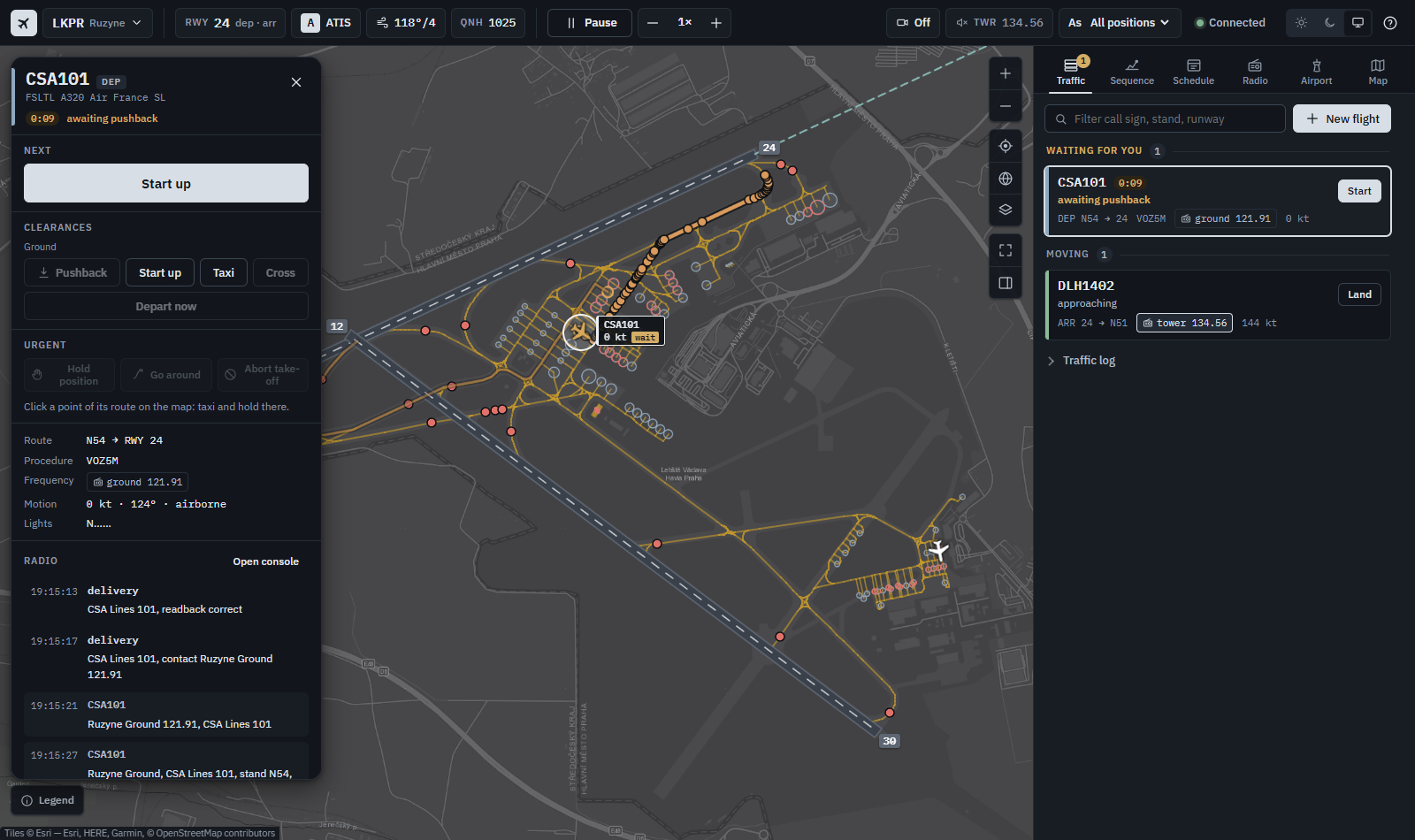
$ go run -C cmd/airport-map . Why SimConnect Go SDK
Build MSFS add‑ons with Go
Zero Dependencies
Standard library only. No external packages to manage, audit, or update.
Fully Typed API
Strong typing with dedicated structs, enums, and typed constants throughout.
Auto-Reconnect
Built-in connection lifecycle management with automatic reconnection support.
Ready-Made Datasets
Pre-built dataset definitions for aircraft, environment, facilities, and traffic.
Tiered Buffer Pooling
Optimized 4KB/16KB/64KB buffer pools for zero-allocation hot paths.
MSFS 2020 & 2024
Full compatibility with both simulator generations out of the box.
From real‑time telemetry dashboards to AI traffic controllers — connect directly to the simulator with a typed, zero‑dependency SDK.
Two ways to connect
Client or manager
Use the low-level client for full control, or the manager for production-ready lifecycle management.
package main

import (
    "log"
    "github.com/mrlm-net/simconnect"
)

func main() {
    client := simconnect.NewClient("My App")

    if err := client.Connect(); err != nil {
        log.Fatal(err)
    }
    defer client.Disconnect()

    // Read simulator data, emit events, etc.
}package main
import (
"fmt"
"github.com/mrlm-net/simconnect/pkg/manager"
)
func main() {
mgr := manager.New("My App",
manager.WithAutoReconnect(true),
)
mgr.OnConnectionStateChange(
func(old, current manager.ConnectionState) {
fmt.Printf("%s -> %s\n", old, current)
},
)
mgr.Start()
}Ecosystem
Built on the same SDK
More tools built on the same SDK — for AI-assisted development and terminal workflows.
SimConnect MCP
MCP serverLet AI assistants query live simulator data and the full SimConnect SDK reference through the Model Context Protocol. Works with Claude Code, Claude Desktop, and any MCP-compatible client.
simvar-cli
CLI toolRead, write, and stream MSFS simulation variables straight from the terminal. REPL, watch mode with CSV/JSON output, and a config file — zero extra installs beyond the Go toolchain.
Explore the docs
Get up and running in minutes
Business Source License 1.1
Commercial use
Free for personal, hobby, community, education and non-profit use. A paid add-on or product, a paid service, or use inside a business needs a commercial licence — open an issue and we'll sort it out.
Open an issueBack open-source MSFS tooling
Support the project
Sponsoring covers infrastructure costs, development time, and MSFS 2020 & 2024 licences required to test against real simulator versions.
Sponsor via RevolutMicrosoft Flight Simulator 2020 & 2024 · Go 1.27+ · Windows · Zero external dependencies