
Examples
Every example is a standalone main package under examples/. Run one from the repository root with go run ./examples/<name> while the simulator is running.
Start with the airport map. It uses most of the SDK at once, shows what the simulator reports, and is the tool the SDK itself is debugged with.
The airport map
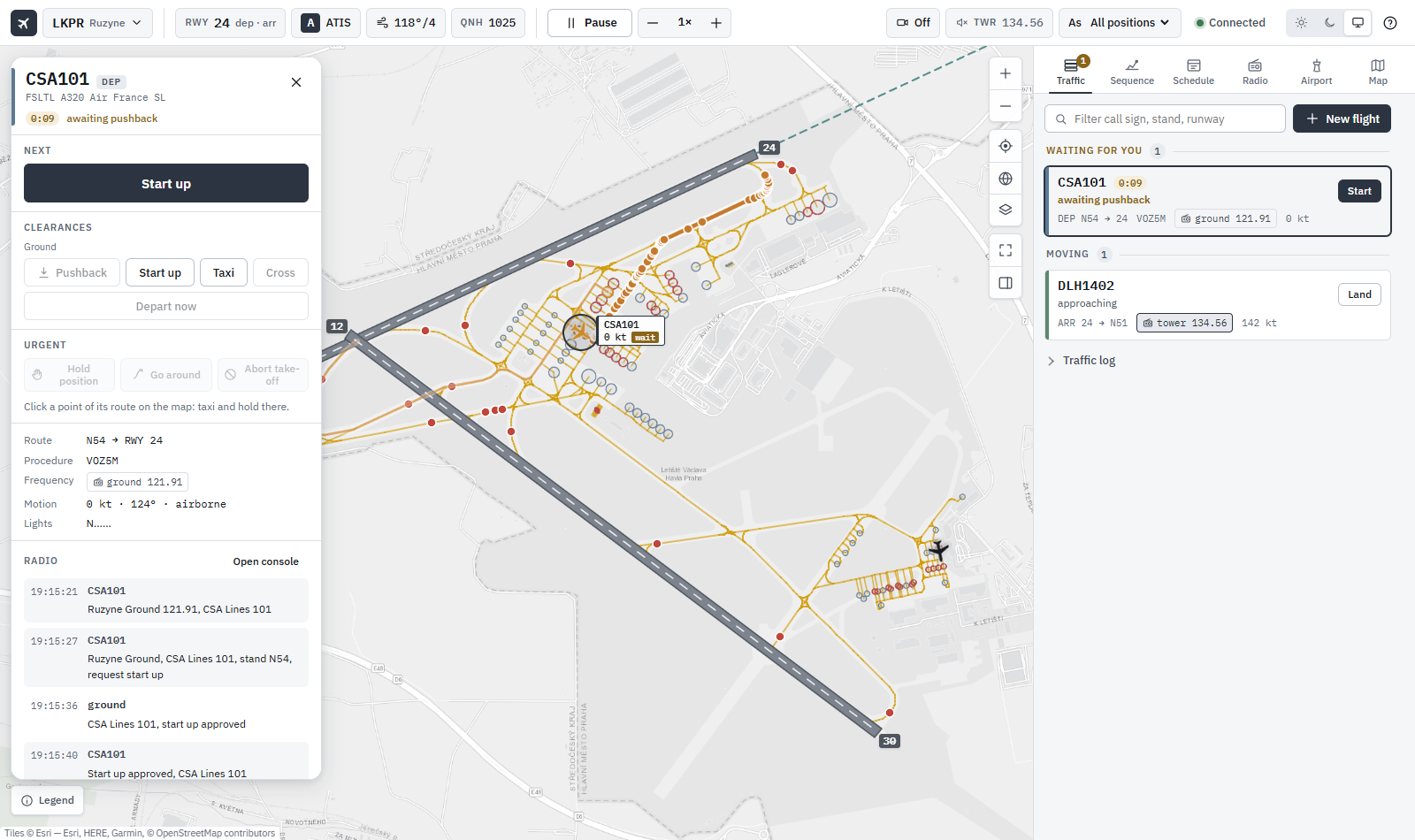
cmd/airport-map serves a live map of an airport on http://127.0.0.1:8080. It shows:
- The ground layout as SimConnect reports it: runways, taxi paths by
TYPE, taxi points, hold-short points, taxiway names and parking stands. Every feature’s popup shows its raw facility index and field values, so the taxi graph can be checked against the data (Airport Layout). - Taxi routing: click a stand and pick a runway to see the departure route, its taxiways and runway crossings, or the taxi-in from a runway exit.
- AI traffic under your control: spawn departures and arrivals and give their clearances: pushback, taxi, progressive taxi, runway crossings, line-up, take-off (Traffic Commands).
- Scheduled traffic: airlines fly a timetable at the airport by themselves, with departure and arrival boards, en route arrivals and overflights (Traffic Schedules, Traffic Manager).
- The landing sequence and the tower: landing order and spacing per runway, delays absorbed by speed, path stretching and holds, go-arounds, and a tower that clears line-up, take-off and crossings (Airborne Separation).
- Conflicts: airborne pairs predicted to come within 5 NM and 1000 ft, and the change given to resolve each.
- The ATC game: work ground and tower yourself, scored (ATC Game).
Run it
# Live: connect to the simulator and open LKPR
cd cmd/airport-map && go run .

# Another airport
cd cmd/airport-map && go run . -icao LOWW

# Also save each fetched airport's raw data to <ICAO>.json
cd cmd/airport-map && go run . -dump

# Offline: serve a saved dump, no simulator needed (layout and routes only)
cd cmd/airport-map && go run . -file LKPR.json
Open http://127.0.0.1:8080/?icao=LKPR. Click the airport at the top left and type another ICAO code to load it; ↻ fetches it again from the simulator.
| Flag | Default | Description |
|---|---|---|
-addr |
127.0.0.1:8080 |
HTTP listen address |
-icao |
LKPR |
Airport opened on start |
-dump |
false |
Write each fetched airport’s raw facility records to <ICAO>.json |
-dump-dir |
. |
Directory for -dump files |
-file |
Serve a -dump file instead of connecting to the simulator |
|
-log-dir |
. |
Directory for the traffic control log, traffic-<YYYYMMDD-HHMMSS>.log |
-airways |
pkg/nav/testdata/LKPR-airways.json |
Airway graph for flight plans (see spike-airways); "" for direct routes |
The page loads Leaflet from cdnjs, the IBM Plex fonts from Google Fonts and map tiles from Esri and OpenStreetMap, so the browser needs internet access.
A tour
The interface has three layers: a status strip across the top, the selected aircraft in its own panel, and the sections at the side (a bottom sheet on a phone). Light, dark or the system’s theme is picked at the top right.
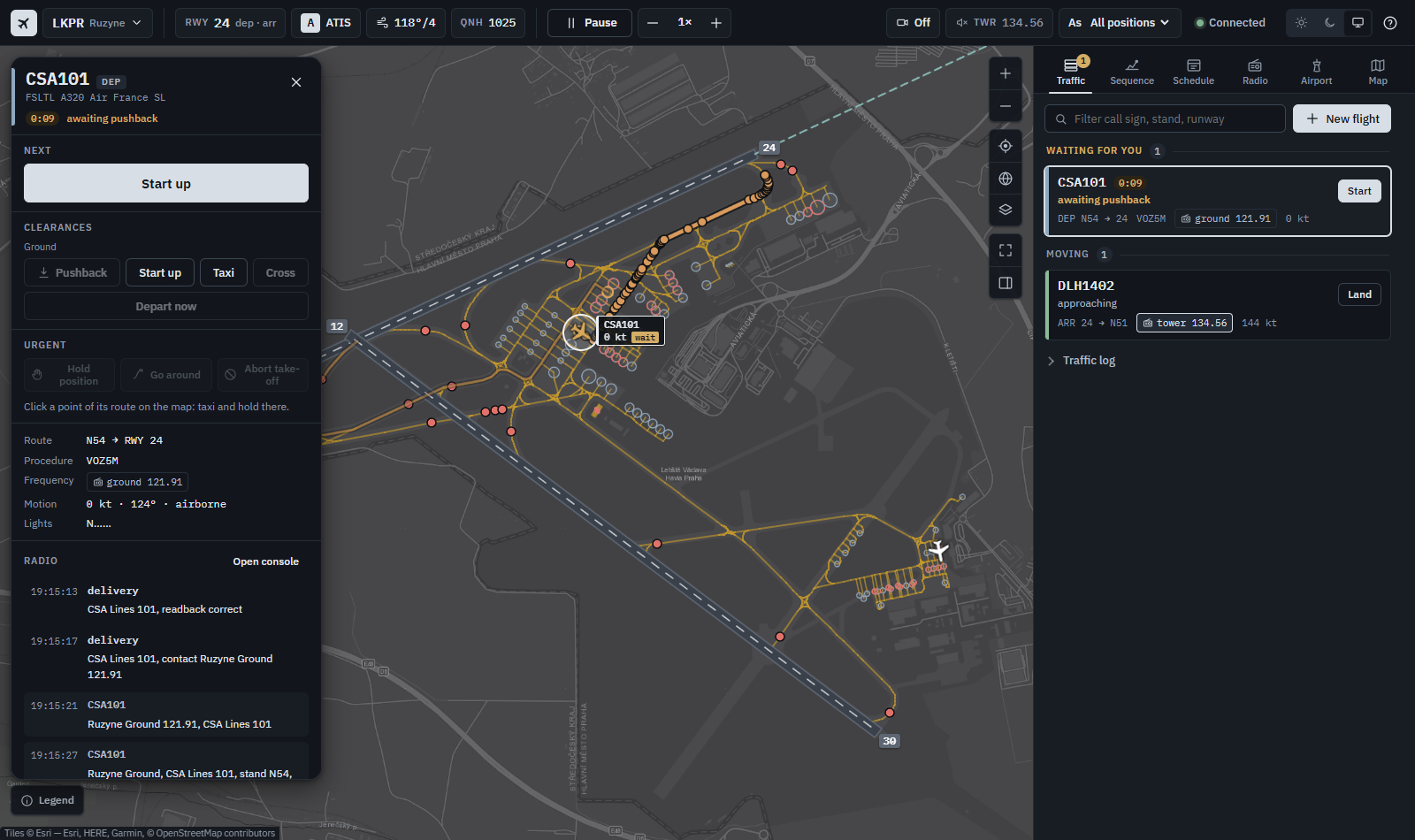
The status strip shows:
- the airport and the runway in use;
- the ATIS letter, the wind and the QNH;
- Pause and the simulation rate;
- the game score;
- the camera;
- the frequency you listen to;
- the position this device works (As, for network play);
- the connection.
The selected aircraft (click it on the map or in a list) shows:
- its flight rules (IFR, or VFR for a circuit arrival), its state, and its scheduled time (STD or STA, amber past 5 minutes late, red past 15) or, without a schedule, how long it has waited;
- the next clearance as one big button. Pushback has its facing (N, E, S, W) and “with start-up” by it, on by default.
- the other clearances by phase;
- Hold position, Go around and Abort take-off, always in the same place;
- its route, procedure, frequency, motion and lights;
- its last calls on the radio;
- Show, Follow, Camera, Manual, Rush and Remove.
Click a point of its route on the map to clear it up to there. The first clearance you give an aircraft makes it Manual: from then on you give all its clearances. Manual off hands it back to ATC automation.
Traffic lists the aircraft waiting for you (oldest first), the ones moving, and those airborne or done. New flight spawns one aircraft:
- Pick the kind, click a stand (or Free stand), and pick the runway with an entry or exit. The route is previewed on the map.
- Optionally set a flight plan, the model and livery, the call sign, a tug, the procedures, a turnaround, de-icing, or a custom taxi route.
- Spawn says what it will do.
The traffic log has every clearance as said.
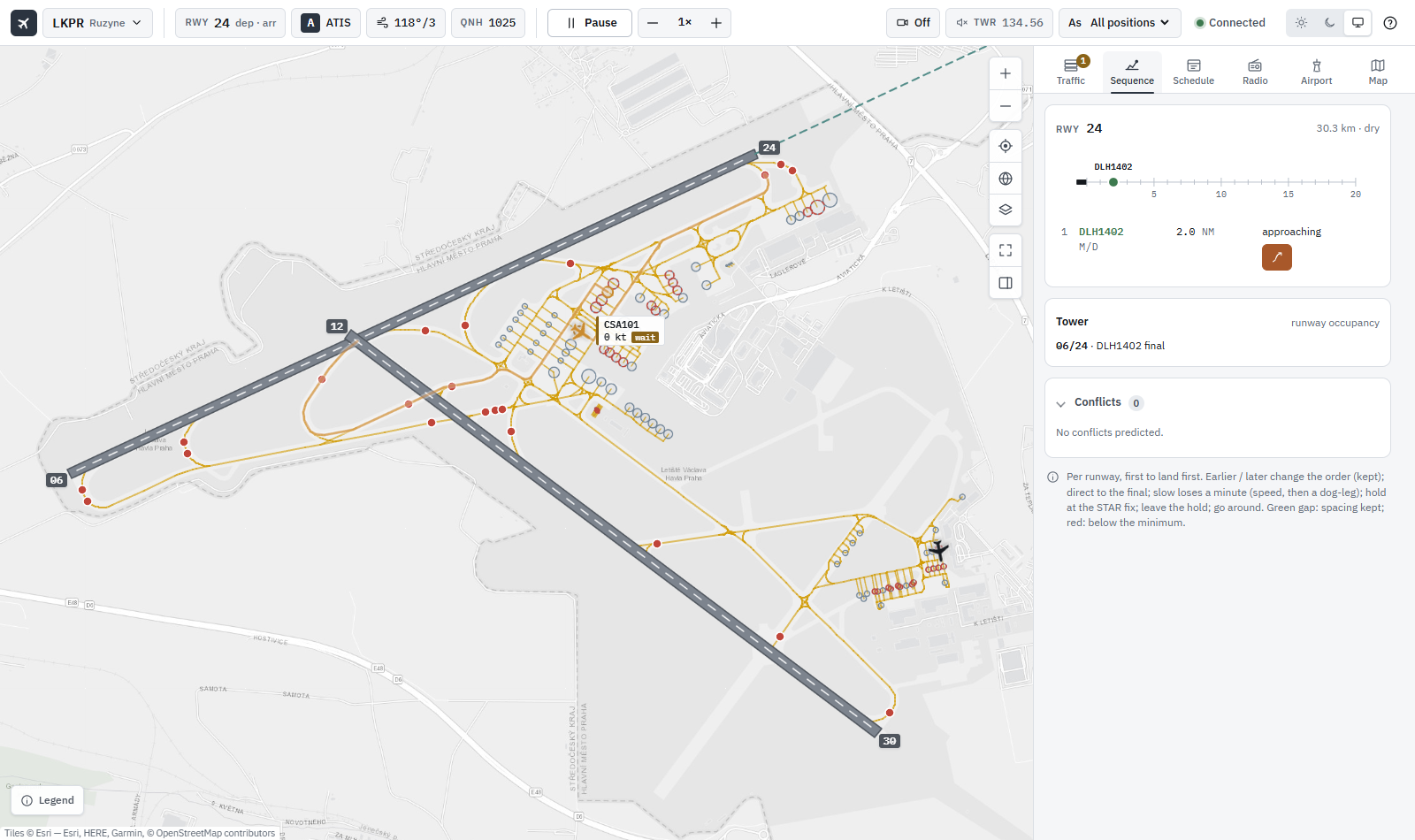
Sequence has:
- the landing sequence per runway: call sign, wake category, distance to go, delay, and what the aircraft is doing;
- controls to move an arrival up or down, send it direct to the final, slow it, hold it or send it around;
- a ladder of the final, with the gaps green when kept and red when short;
- the tower (who is at each runway, and what they wait for) and the predicted conflicts.
Schedule runs the timetable at the airport. It has the departure, arrival and overflight boards, and the ATC game.
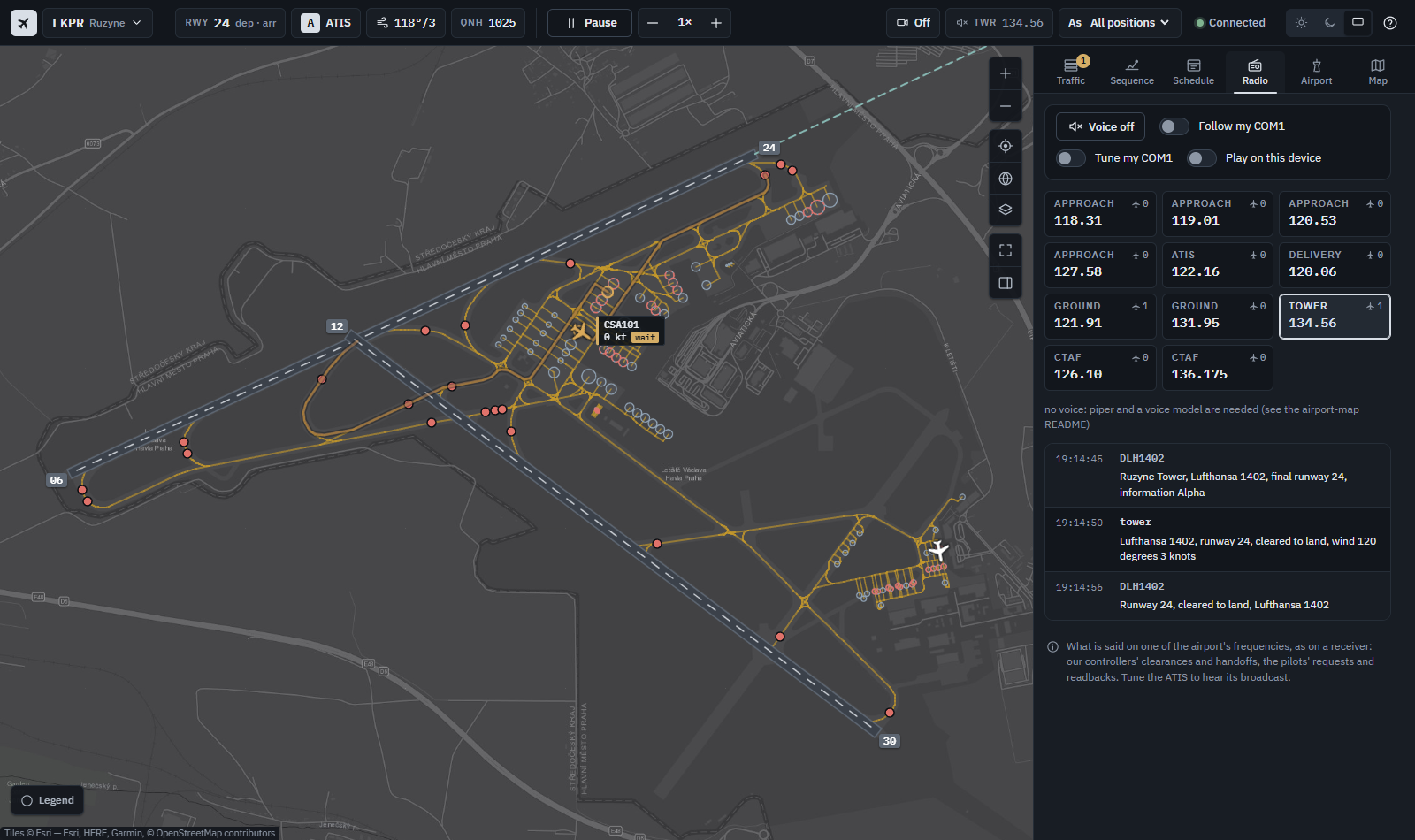
Radio lists the airport’s frequencies with the aircraft on each, and the conversation on the one followed. The voice can play:
- on the map’s computer, on the output picked;
- on the device you are using (Play on this device).
Follow my COM1 and Tune my COM1 link the radio to your aircraft.
Airport has:
- the runway in use, the weather and the ATIS (Listen reads it out);
- the SIDs, STARs and approaches of a runway, drawn on the map;
- the de-icing pads.
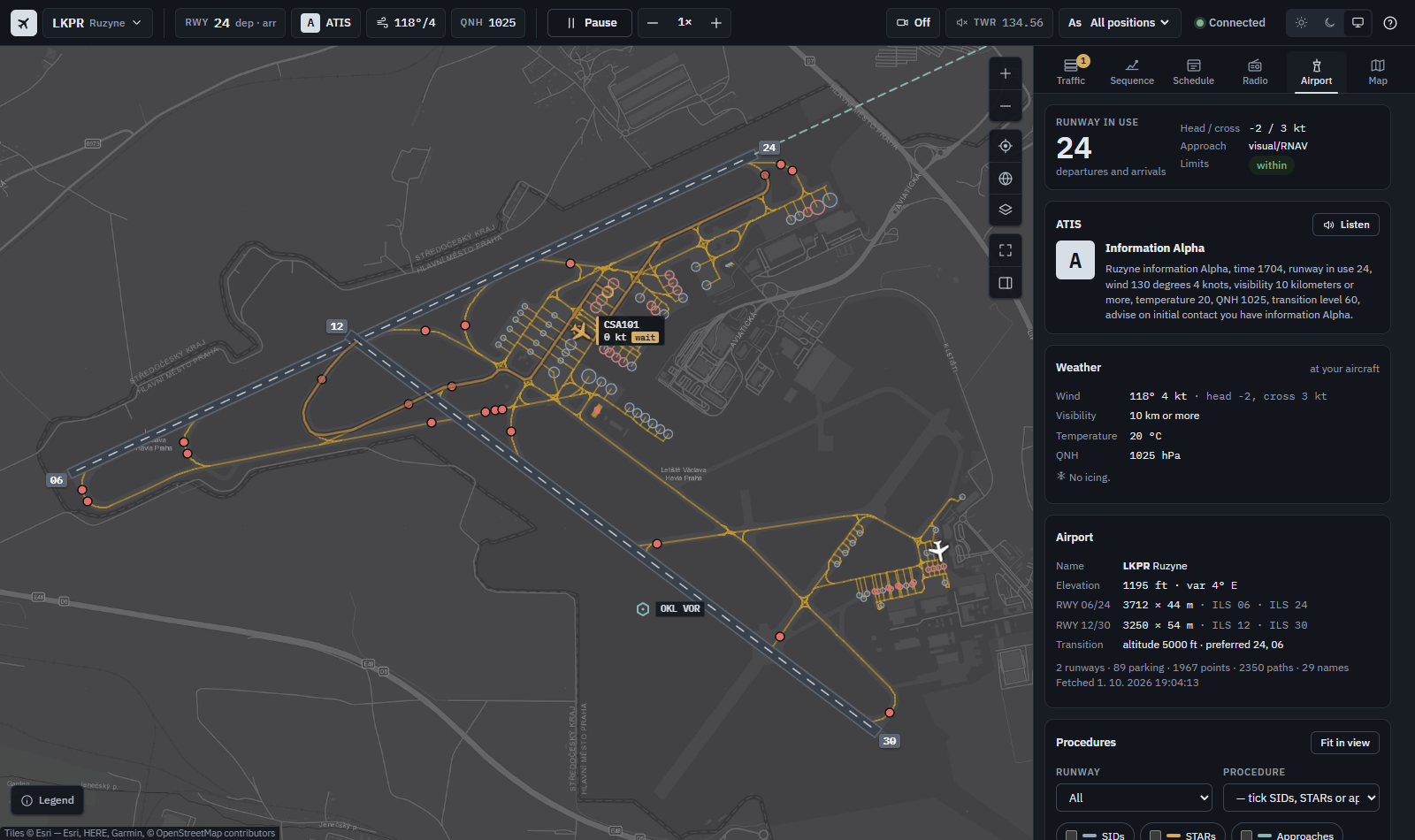
Map has:
- the base map;
- the layers: our aircraft, other traffic, safe zones, the final, taxiway names, overlapping and occupied stands, and taxi paths and points by
TYPE; - the traffic picture’s centre and radius, and the world view.
On a phone the sections are a bottom sheet over the full-screen map:
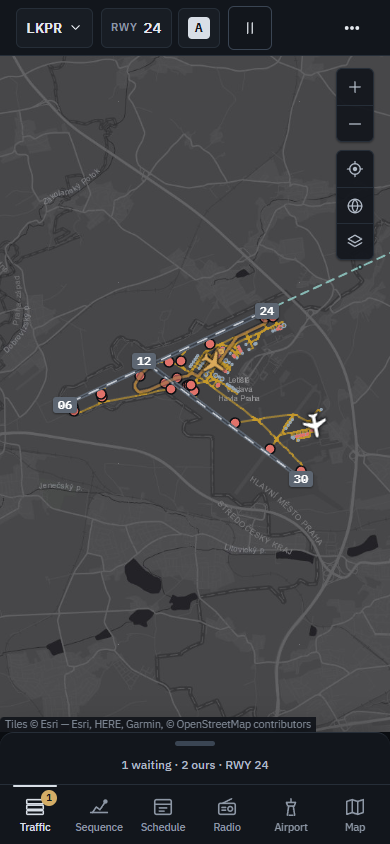
The map’s README covers network play (-addr :8080, one position per device) and lists the HTTP API, which scripts and tests can use too. The previous interface is at /classic while the new one settles.
Other examples
Smaller examples, each showing one part of the API.
Connection and lifecycle
| Example | What it shows | Docs |
|---|---|---|
| basic-connection | Connect, print the simulator’s open message, disconnect | Getting Started |
| await-connection | Retry until the simulator is up, shut down on Ctrl+C | Client API |
| lifecycle-connection | Reconnect whenever the simulator quits and comes back | Client API |
| simconnect-manager | pkg/manager: auto-reconnect and connection state callbacks |
Manager Usage |
| simconnect-state | Manager SimState: pause, sim running, camera state |
Manager Usage |
| simconnect-subscribe | Manager channel subscriptions instead of callbacks | Manager Usage |
| simconnect-events | Manager system events: flight and aircraft loaded, flight plan, objects added and removed | Event Lifecycle |
| simconnect-benchmark | Load test of the manager stack with CPU and memory profiles |
Data and events
| Example | What it shows | Docs |
|---|---|---|
| read-messages | Data definitions and periodic SimVar requests for the user aircraft and camera | Client API |
| read-objects | EnumerateSimObjectsAndLiveries: the aircraft and liveries installed |
Client API |
| set-variables | Write a SimVar: change CAMERA STATE |
Client API |
| using-datasets | The dataset registry, cloning, the builder and merging | Dataset Composition |
| emit-events | Map and transmit client events: toggle aircraft doors | Client API |
| subscribe-events | System event subscriptions: pause, sim start and stop, sound | Event Lifecycle |
| flow-events | SubscribeToFlowEvent (MSFS 2024 only) |
Client API |
| cmd/simvar-cli | Read, write, watch and stream SimVars from the terminal (own go.mod) |
SimVar CLI |
Facilities
| Example | What it shows | Docs |
|---|---|---|
| read-facility | Facility data definitions for one airport | Facilities |
| read-facilities | Facility lists, paginated | Facilities |
| subscribe-facilities | Subscribe to the airport list and its updates | Facilities |
| all-facilities | Request the full airport list at once | Facilities |
| airport-details | Parking, runways and taxi paths of one airport, multi-packet responses | Facilities |
| locate-airport | The nearest airports to the user aircraft | Facilities |
| read-waypoints | Waypoint facility data | Facilities |
| simconnect-facilities | The ready-made facility datasets through the manager | Datasets |
Traffic
| Example | What it shows | Docs |
|---|---|---|
| ai-taxi | One departure: pushback, taxi, line-up and take-off with pkg/traffic |
Departure Taxi |
| ai-arrival | One arrival: final, touchdown, runway exit and taxi-in to a stand | Arrivals |
| ai-traffic | Raw SimConnect: parked and en route ATC aircraft from planes.json (run it from its folder) |
Traffic Guide |
| manage-traffic | Raw SimConnect: parked and airborne aircraft at LKPR driven by waypoints | Traffic Guide |
| monitor-traffic | Every aircraft within 25 km, polled every 5 seconds | Client API |
| simconnect-traffic | The manager’s traffic fleet: a parked aircraft at LFPG and a non-ATC aircraft at LKPR on waypoints, removed on exit | Traffic Guide |
Navigation and weather
| Example | What it shows | Docs |
|---|---|---|
| atis | Weather at the user aircraft, the runway in use and the airport’s ATIS | Weather & ATIS |
| flight-plan | An IFR plan between two airports over the airways, written as a .pln |
Flight Plans |
| spike-airways | Crawl the airway network around a centre and save it as JSON (the map’s -airways) |
Airways |
Spikes
Experiments kept as a record of how the traffic features were found. Each answers one question about the simulator; they are not maintained as examples.
| Example | Question |
|---|---|
| spike-airlines | Can the airlines of a parking spot be read? |
| spike-approach | Can a final approach, flare and rollout be flown by position injection? |
| spike-flare | Which flare profile gives a good touchdown? |
| spike-gear | How is the gear of a non-ATC aircraft lowered? |
| spike-geometry | What does the simulator report of an aircraft’s gear, span and CG? |
| spike-inject | Can a frozen AI aircraft be moved along a taxi route by injection? |
| spike-landing | Waypoints or ATC for landing, and a takeover on the ground |
| spike-lights | How are the lights of a non-ATC aircraft switched? |
| spike-lighttiming | When does MSFS AI switch the lights of a taxiing aircraft? |
| spike-procedures | The record layout of SIDs, STARs and approaches |
| spike-profile | Which type SimVars do AI aircraft report reliably? |
| spike-speed | How can an AI approach be flown slower? |
| spike-tug | Which ground vehicles are pushback tugs? |
| spike-tugwatch | Where is an injected tug relative to its aircraft? |